[MacOSX] QuartzComposerを利用してキャプチャ
QuartzComposerを利用する利点
QuartzComposerファイルを利用し,そこから,映像ストリームを取得することができる.
この仕組みの利点は,QuartzComposerでビジュアルプログラミングした結果を利用して,画像処理を行うことができることである.
例えば,2値化や色相フィルタ,先鋭化フィルタなどをQuartzComposer内で組み立て,それをプログラムから読み出し,より詳しい画像処理を行うといったことができる.以下は,そのイメージ図である.
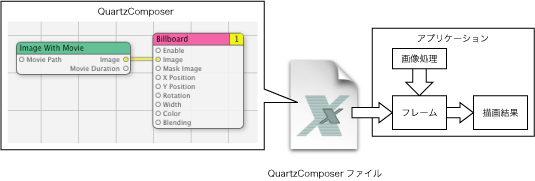
処理の流れ
準備から始まる,一連のQuartzComposerからのフレーム取得流れは以下のようになる.
これがQuartzComposerのレンダリング結果が返されるものとなる.
これがQuartzComposer用のレンダリングコンテキストとなる.
ピクセルバッファ・レンダリングコンテキストの作成
ピクセルバッファの作成は,以下のコードで行う.
_pixelBuffer = [[NSOpenGLPixelBuffer alloc]
initWithTextureTarget:GL_TEXTURE_RECTANGLE_EXT
textureInternalFormat:GL_RGBA
textureMaxMipMapLevel:0
pixelsWide:width
pixelsHigh:height];
レンダリングコンテキストは,一般のコンテキストと同じ手順で作成する.
[_openGLContext setPixelBuffer:_pixelBuffer
cubeMapFace:0
mipMapLevel:0
currentVirtualScreen:[_openGLContext currentVirtualScreen]];
これでピクセルバッファを描画先にセットする.
これで,描画はピクセルバッファに行われる.
QuartzComposerファイルを開いて初期化
_renderer = [[QCRenderer alloc]
initWithOpenGLContext:_openGLContext
pixelFormat:format
file:fileName];
以下の初期化メソッドで,QuartzComposerファイルを開いて初期化する.
2つめの引数には,先に作成したOpenGLのコンテキストを代入する.
メモリの確保
ピクセルバッファのためのメモリを確保する.
Appleのサンプルでは,以下のように確保している.
_scratchBufferRowBytes = (width * 4 + 63) & ~63;
_scratchBufferPtr = valloc(height * _scratchBufferRowBytes);
コードとコメントアウトを見ると,横幅のメモリのバイト数が,64の倍数になるように確保するようだ.
なぜか,vallocを使っている.mallocじゃだめなのかなぁ・・・.以下がAppleのサンプルのコメント.
Create a scratch buffer used to downloads the pixels from the OpenGL pixel buffer.
For optimal performances the buffer is paged-aligned and the rowbytes is a multiple of 64 bytes
マヂでそうなの・・・?
でもvallocを使う理由にはなってない気がする.
QuartzComposerからフレームを取得する
//Render a frame from the composition at the specified time
if(![_renderer renderAtTime:time arguments:nil])
return nil;
//Read pixels back from the OpenGL pixel buffer in ARGB 32 bits format
//For extra safety, we save / restore the OpenGL states we change
glGetIntegerv(GL_PACK_ROW_LENGTH, &save);
glPixelStorei(GL_PACK_ROW_LENGTH, _scratchBufferRowBytes / 4);
glReadPixels(0, 0, width, height, GL_RGBA, GL_UNSIGNED_INT_8_8_8_8, _scratchBufferPtr);
glPixelStorei(GL_PACK_ROW_LENGTH, save);
参考サンプル
QuartzComposerTextureは,QuartzComposerファイルのストリームから直接OpenGLのテクスチャを作成している.また,QuartzComposerOfflineは,読み取った画像フレームをBitmapImageRepに放り込んで.TIFFの書き出しAPIを利用し,画像ファイルとして,10フレームを書き出すサンプルである.